Guides / 6 min read
Harvard CV format: the one-page, education-first layout explained
The Harvard format is the plain, one-page CV layout taught by Harvard's career office and copied around the world. What it looks like, when to use it and how to write one.
Search for a CV template in Indonesia, Vietnam or Thailand and “Harvard” comes up again and again. The name refers to the resume layout Harvard's career office teaches its students: one page, education first, plain black type, and bullet points that start with an action verb. It has become shorthand for a clean CV that recruiters and applicant tracking software can both read in seconds.
This guide explains what the Harvard format looks like, when it is the right choice, and how to write each section. CVFalcon is not affiliated with Harvard University; “Harvard format” here describes a widely used layout style.
What the Harvard CV format looks like
- One page for students and graduates, two at most for experienced candidates.
- Your name centred at the top, with one line of contact details beneath it.
- Section headings in capitals above a thin rule.
- Education first for students and recent graduates, then experience, leadership and activities, and skills.
- For each entry, the organisation and location on one line and your role and dates on the next, with dates aligned on the right.
- Bullet points that begin with an action verb and end with a result.
- Black serif or simple sans-serif type, with no photo, colours, graphics or tables.
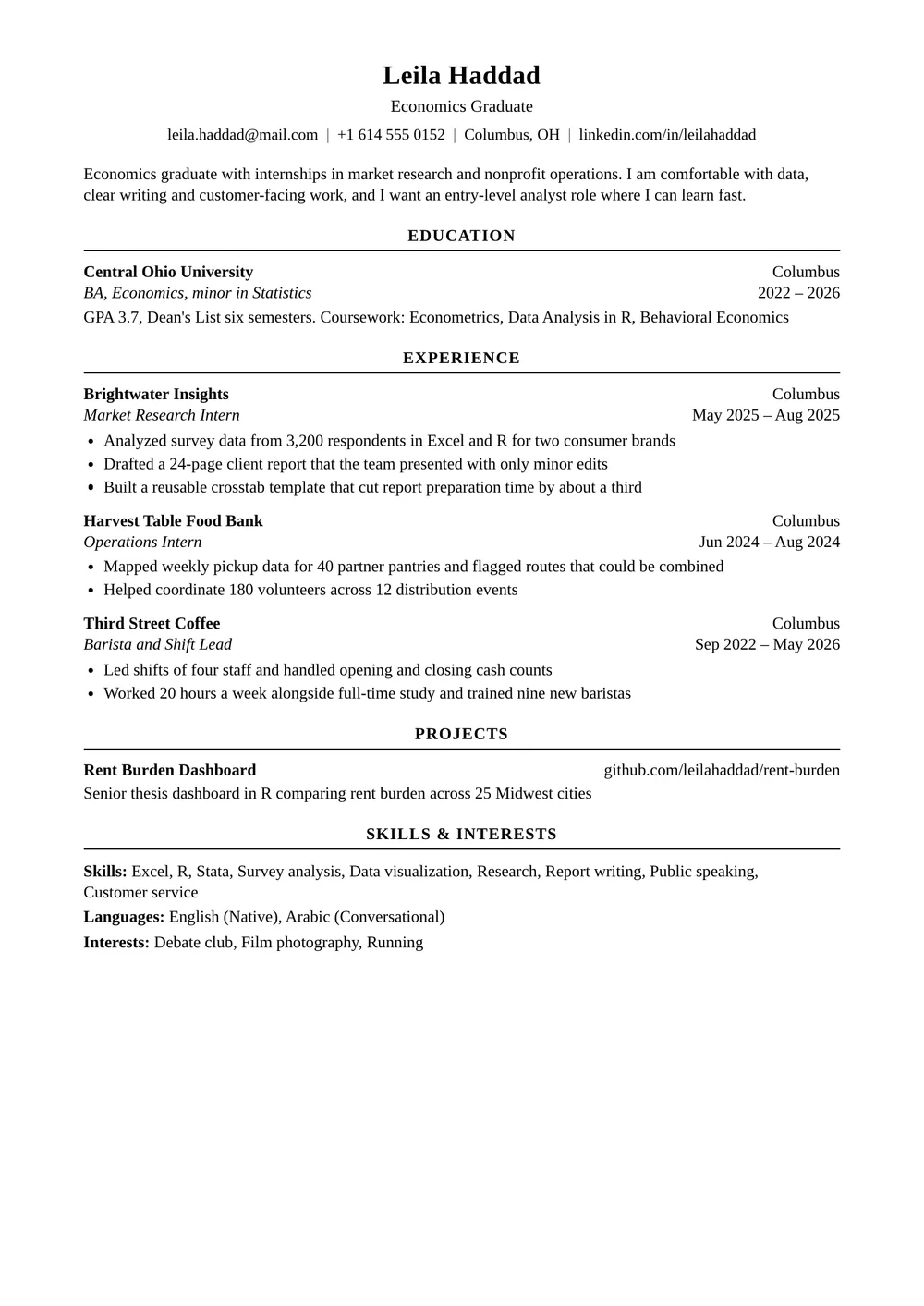
The Harvard Style template follows this layout on A4 or US Letter, with education first and black serif type.
See the templateWhy the Harvard format works
It is built for fast reading. A recruiter's eye can run down the left edge to pick out each organisation and down the right edge for dates, without hunting. There is nothing to decode: no skill bars, no icons, no columns.
It is also easy for applicant tracking software, the systems large employers use to collect and search applications. One column, standard headings and real text mean the software reads every line in the right order. That is why people searching for an ATS-friendly CV often end up with a Harvard-style layout.
When to use it, and when not to
The Harvard format suits students, graduates and internship applicants, and anyone applying to banks, consulting firms, law firms, government bodies, universities and large multinational employers. It is also a safe choice when you apply through an online portal and do not know who will read your CV.
It is a weaker fit where the look of your CV is part of the job, such as graphic design, or where local custom expects extra details. In the Gulf, recruiters expect nationality, visa status and often a photo, so a Gulf CV adds a personal details block to this structure.
How to write each section
Header
Your full name in bold, then a single line with phone number, email, city and LinkedIn profile. Leave off your date of birth, marital status and photo unless the country you are applying in expects them.
Education
Students and graduates put education first, with the university and its location on one line and the degree and graduation date on the next. Add your GPA if it is strong, honours, relevant coursework and a thesis title if it relates to the job. After two or three years of work, move education below experience.
Experience
List jobs and internships in reverse chronological order, with two to five bullet points under each. Start every bullet with a past-tense action verb such as led, built, analysed or reduced, keep it to one or two lines, and give the result with a number where you can.
- Weak: “Responsible for social media accounts.”
- Better: “Grew the society's Instagram from 800 to 4,100 followers in one semester with a weekly student-profile series.”
Leadership and activities
Student societies, volunteering, team captaincy and competitions go here, written the same way as jobs: organisation, role, dates and what you achieved. In the Harvard Style template, use the projects section for these.
Skills and interests
Close with one short section of labelled lines: technical skills and software, languages with an honest level, and two or three interests that say something about you. The Harvard Style template sets these with bold labels, as in the example above.
Formatting rules
- One typeface throughout, 10 to 12 points for body text.
- Margins of about 1.5 to 2.5 cm on every side.
- Dates in the same format everywhere, aligned on the right.
- No first person: write “Led a team of six”, not “I led a team of six”.
- Send it as a PDF with selectable text, so the layout and the text both survive.
The Harvard format outside the US
The layout started in the US, where a one-page resume on Letter paper is the norm, but it travels well. In the UK, Ireland, Singapore, Hong Kong and much of Southeast Asia the same structure works on A4, usually called a CV rather than a resume. In Indonesia, “CV Harvard” is often used to mean an ATS-friendly CV, and this layout meets that request. Adjust only the local details: paper size, spelling and whether a photo is expected.
Start from the Harvard Style template, type or import your details, and preview for free. Pay once when you want the PDF.
Use the Harvard Style templateCommon questions
What is a Harvard CV?
A one-page CV in the style Harvard's career office teaches: education first for students, plain type, a centred name and contact line, and bullet points that start with action verbs.
Is the Harvard CV format ATS-friendly?
Yes. It uses one column, standard headings and real text, so applicant tracking software reads it in order. Send it as a PDF with selectable text.
Can I use the Harvard format if I have work experience?
Yes. Once you have two or three years of relevant work, put experience first and keep education below it with fewer details.
Does a Harvard CV have a photo?
No. The format has no photo. Add one only where local custom expects it, as in parts of the Gulf and East Asia.
Is CVFalcon connected to Harvard University?
No. “Harvard format” describes a widely used layout style. CVFalcon is not affiliated with or endorsed by Harvard University.
Keep reading
- How to make an ATS-friendly CVHow applicant tracking systems read a CV, which layouts and files trip them up, and how to match the job ad's keywords without stuffing.
- How to write a CV with no experience: students and fresh graduatesNo full-time job yet? What to put on your first CV, how to write it so it reads like evidence, and the mistakes that make graduate CVs look thin.
- How to write a CV, step by stepA step-by-step method for writing a CV that gets read: sections in the right order, bullets built on results, and a quick way to tailor it to each job ad.